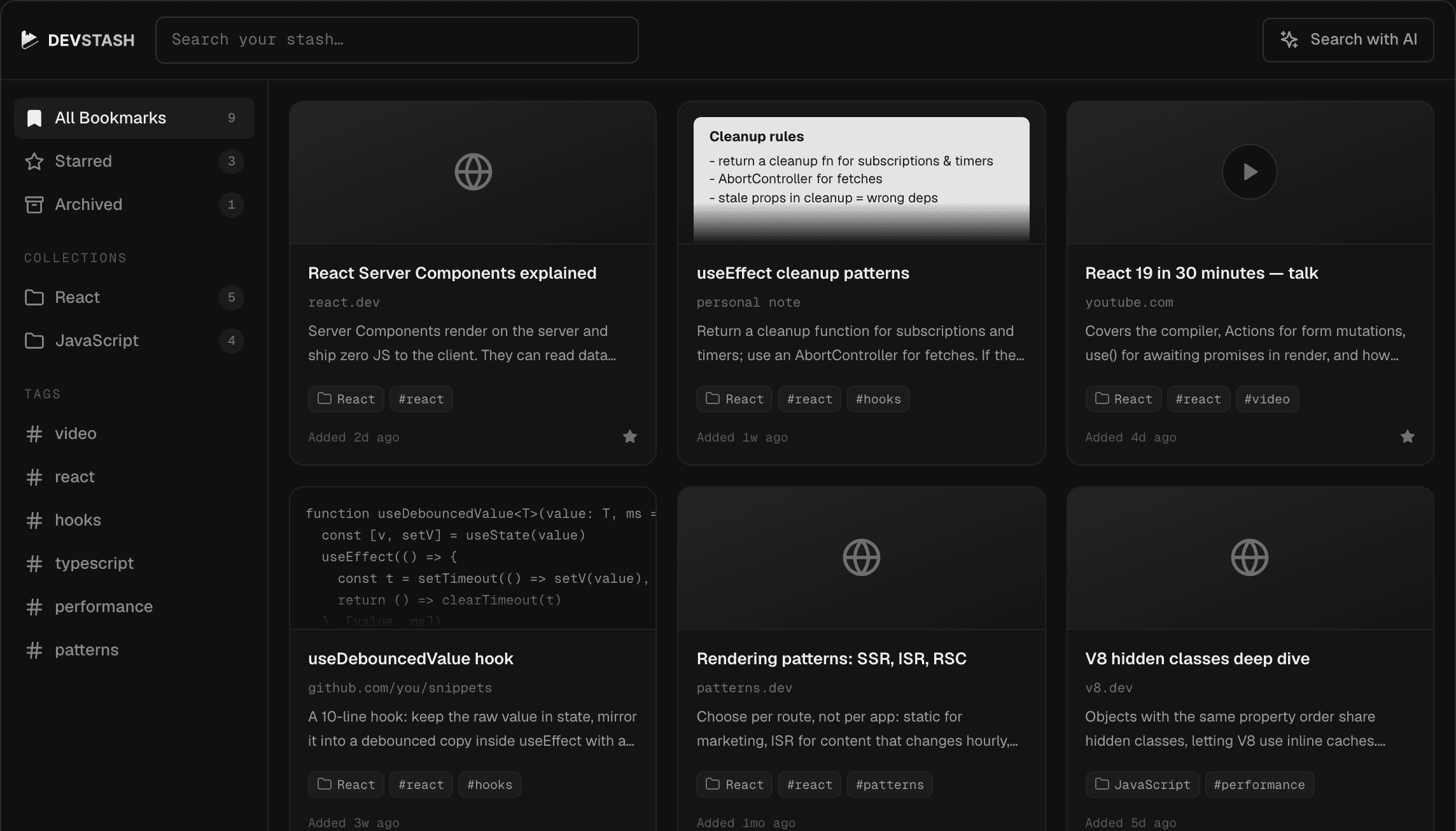
100+developers bookmarking daily

The bookmark manager
built for developers

Save links, articles, code, and ideas. Find and read them later. Use AI to summarize and explain your saved content.

No credit card · 100 welcome credits

devstash.app
// features

Your all-in-one
bookmark manager

Keep your links, snippets, and notes in one place. Search them and ask questions about them.

Save everything

Save links, articles, videos, notes, and code. Organize everything by tags and collections, and use the reader view for distraction-free reading.

  • Save articles, notes & code snippets
  • Organize by tags and collections
  • Distraction-free reading with reader view
Building a design system in React
smashingmagazine.com
Added May 30, 2026
The Go-To Guide for Keyboards in RN
blog.margelo.com
Added May 30, 2026
Add Bookmark
URL BookmarkSave a link
NoteWrite a quick note
Code SnippetSave a code snippet
save anything

Smart search

Easily find your saved bookmarks. Filter by tags or collections, or use AI to search across the content of everything you've saved.

  • AI-powered full-text search
  • Filter by tags or collections
reactESC
Bookmarks
Understanding useNativeState in Expo UI | Code with Beto
codewithbeto.dev
Expo UI: Truly Native iOS and Android Components in React Native
reactnative.rocks
Expo Router v56: Decoupling from React Navigation
expo.dev
The Go-To Guide for Understanding Keyboards in React Native (Part 1)
blog.margelo.com
↑↓ navigate↵ selectesc close
smart search

Chat with your library

Ask questions and get instant summaries for anything you've saved. From articles to code snippets to videos, just ask and get the key points right away.

  • Ask questions about anything you've saved
  • Get instant summaries for articles, code & videos

Ask

About your saved bookmarks

What React articles did I save?

Here are the React articles you saved:

  1. 1.How React Native builds actually workSummary: How React Native builds actually work.
  2. 2.29 React Codebase Red Flags from a Senior Frontend DeveloperSummary: Spot them early. Fix them before they compound.
  3. 3.The Go-To Guide for Understanding Keyboards in React Native (Part 1)Summary: A deep dive into keyboard handling in React Native.
Ask about links, code, notes…
ai chat

GitHub integration

Connect your GitHub account to automatically sync your starred repositories into a dedicated collection. Each repo becomes fully searchable, and AI can answer questions about any of them.

  • Auto-sync starred repos
  • Organized in their own collection
Starred · synced from GitHub
12 starred repos synced just now
facebook/react
The library for web and native user interfaces
228k
vercel/next.js
The React framework
127k
tailwindlabs/tailwindcss
A utility-first CSS framework
83k
github sync
Plus everything else
01

Save everything

Links, notes, articles, videos, code snippets, and more.

02

Read it everywhere

Web, desktop, and mobile — your library stays in sync across all of them.

03

Collections & tags

Group by project, topic, or any system that works for you.

04

Smart search

Search titles, descriptions, and tags — or use AI to search the full content.

05

Chat with your library

Ask AI about a single article, a code snippet, or your entire library.

06

Listen to articles

Easily turn your saved articles into audio podcasts.

07

Video transcripts

Get a full transcript of YouTube, Vimeo, or Dailymotion videos.

08

Reader view

Distraction-free reading for articles and videos.

09

Broken link checker

Finds broken and dead links across your library and keeps it clean.

10

Duplicate finder

Finds duplicate links across your library and keeps it tidy.

11

GitHub integration

Connect GitHub and sync your starred repositories into your library.

12

Public collections

Share a collection with a public link — anyone can browse, no sign-in needed.

// Apps & Extensions

Get DevStash Everywhere

Available across web, desktop, mobile, and your browser. Save and access your library from anywhere.

// pricing

Pay only for
what you use

No subscriptions, no seats, no surprises. DevStash uses credits, pay only for what you use.

Free to start
100 credits
on every new account · no credit card
Create free account
  • Browse & search saved contentFree
  • Save a bookmarkUses credits
  • AI features (summarize, explain & chat)Uses credits
  • Video transcriptionUses credits
  • Listen to articleUses credits
Check the credits page for credit pricing.
// faq

Frequently Asked Questions

DevStash is a bookmark manager built for developers. Save articles, code, and notes to read later, organize them with collections and tags, and find them with powerful full-text search. Chat with your bookmarks using AI, listen to articles as audio, and get transcripts for video bookmarks.

DevStash is free to try. Every new account gets 100 welcome credits to start. Browsing, searching, editing are free. Saving bookmarks, AI features, audio, and video transcription use credits.

Credits are deducted only after an action succeeds. Each action, such as saving a bookmark, using AI features, or video transcription, has its own credit cost. See the credits page for current pricing. Your balance and usage history live under Billing.

Yes — DevStash has browser extensions for Chrome, Firefox, and Edge so you can save any web page from the toolbar in one click. iOS and Android apps are on the way.

Start Bookmarking. It's free.

100 welcome credits · no credit card

Try DevStash now